<article>
Started: Tues 24 March 2026
Finished: Tues 27 April 2026
Published: Tues 5 May 2026
Never look at Discord Again: XMPP Bridges are good now
There has been discussion lately on chat protocols, unfortunately I am late to this party since the zeitgeist has already move onto uhhhhh
Unfortunately this is not a guide to revolutionary change instant messaging technology and unshackle us from dystopian panopticons with a new decentralized, end to end encrypted, federated, zero trust, community orientated multimedia protocol or whatever people are pushing these days but rather dragging what ultimately is a promise from the past kicking and screaming into the present.
The Promise: Pidgin
What if all the people you knew online could be communicated to with the same interface?
No hopping between your Skype, IRC, AIM…The flower one, just one interface so you can thank you grandma on Skype for the new sweater, talk to your warez friends on IRC, message your normie friends on AIM and get blackmailed on the flower one1 with one application and one interface.
This promise has been kicking around for nearly 30 years2 with Pidgin. Its a traditional desktop app the runs on Linux and Windows, it has “plugins” that contain code to network with various past and present “““protocols”““, ofcouse all written in C and just dlopened in.
I used pidgin for many years and can confirm that it works, quite well. I used its plugins for Whatsapp, Teams and Discord, they weren’t nearly “set and forget”, some features (that I cared about) were not implemented or were jankily so, but it had by far the best user interface of any chat app I’ve yet to use. It was fast, worked well with your GTK(2) theme, and got out of your way.
Better than pidgin is my current baseline for “better” which is already kinda a hard sell. I switched from pidgin just because of the lack of a mobile client and spotty “offline message history”. If you don’t care about those things than just use pidgin honestly.
Also pidgin is still in development nearly 30 years later and is getting a swanky new 3.0 version!
The Protocol: XMPP
XMPP, is only a month or so younger with its existence announced in January of 1999, its first implementation in February 2000 and then standardized in 2004
I should clarify that XMPP is a fully featured protocol in its own right with replies, emoji reactions, chat rooms, video conferencing, encryption, and its own network of servers. XMPP is built to be a replacement to centralized protocols and is an excellent one at that. Unfortunately something something network problem were stuck with TRASH boohoo.
However thanks to this full featuredness, XMPP makes for an excellent inbetween protocol between your legacy one “Discord, Whatsapp, Telegram…” and your client. A major problem with pidgin is that pidgin didn’t support replies, thus all of its plugins that connected to protocols that unsurprisingly did support replies had a fun and bespoke way to show replies, multiply this with every new feature from 2003 and you have J A N K
In Addition XMPP of course works best between XMPP clients, However It does acknowledge programs that might want to connect to legacy protocols strewn across its dozens of standard, leading to some light standardization of them (like the name legacy protocol!). XMPP being the eXtensible Messaging and Presence Protocol is also well suited for integrating these programs.
Enter Slidge & Prosody
Slidge the new bridge program for XMPP, like all good things its a python program advertising itself as beta-grade software but were rolling with it anyways.
Prosody is a XMPP server written in Lua. There are alternatives, such as ejabberd written in Erlang and Openfire written in Java however Prosody seems to be the easiest to setup and geared more towards hobbyist installations.
Installation Guide
Since XMPP is a networked protocol it requires you to run the server somewhere. XMPP takes hilariously little resources so the cheapest plan of your VPS provider should suffice, unlike some other protocols ahem Matrix.
First you install prosody, if your on linux it should already be in your repo.
Second you install slidge, unfortunately slidge isn’t in most repos, however there is a debian package. Failing that your should be able to just
pipx install slidcordAccording to their documentation. Since I installed it using the debian packages I’ll assume you have too.
- Write the prosody configuration file
There should be an example configuration file at
/etc/prosody/prosody.cfg.lua. You can largely follow the configuration guide however
I’ve included some sections which need to be added to get slidge
working. You can also take some shortcuts if running locally
admins = {"admin@inside"}
#...
http_files_dir="/var/lib/slidge/attachments"
http_interfaces = { "127.0.0.1" }
http_ports = { 5280 }
http_default_host="inside"

modules_enabled = {
    #...
    "privilege";
    "http_files";
    #...
}

privileged_entities = {
    ["discord.inside"] = {
        roster="both";
        message="outgoing";
        iq = {
            ["http://jabber.org/protocol/pubsub"] = "both";
            ["http://jabber.org/protocol/pubsub#owner"] = "both";
            ["urn:xmpp:http:upload:0"] = "get";
        }
    },
    #... <repeat for each service>

VirtualHost "inside"

Component "discord.inside"
    component_secret = "<your secret>"
    modules_enabled = {"privilege"}

}insideis localhost on my machine, I just added127.0.0.1 insideto my/etc/hosts. I found specifying localhost or an ip for prosody led to weird behavior, however YMMV.For a production instance you share with other people DNS is very important, and is covered in more detail in the official documentation. You should have an actual domain name
privilegeis a third party plugin that allows components (the eXtensible part of XMPP 4) to automatically add new people to your list of contacts, or your “roster”, when connecting to the legacy protocolUnfortunately
privilegemay not be included in the your set of prosody plugins so you need to fetch it from Prosody Community Modules. I couldn’t get theprosodyctl installcommand working on my machine, so I had to install mercurial and fetch the entire repository following the manual install instructions. The module directory can be found at/usr/lib/prosody/modulesand you can just copy/symlink in theprivilegemodule.The
privilegemodule is only needed if you want slidge to automatically add your discord/whatever contacts to your roster. You can remove themodules_enabled = {"privilege"},privileged_entitiesandmodules_enabled = { privilege; }to not bother with this. Unfortunately slidge does not automatically add group chats to your roster even withprivilege.The
http_filesplugin serves files over HTTP. Literally. Its used for image support for slidge, as slidge will save images at/var/lib/slidge/attachments(or wherever you specifyno-upload-pathin the corresponding slidge file) and when prosody wants to show an image it’ll just send a link to http://127.0.0.1:5280/(or whatever no-upload-url-prefixis set to) in the text message andhttp_fileswill be hosting the image at that locationYou can skip the
http_filessection if you want to serve the files using a proper web server, or skip image support.
- Create your prosody admin
$ prosodyctl adduser admin@inside
Since we already specified that username as an admin in
/etc/prosody/prosody.cfg.lua it should have admin
privileges. Otherwise you can use
prosodyctl shell user set_role admin@inside prosody:admin
- Then configure slidge, there should be a
/etc/slidgecontaining example files something like:
../
./
conf.d/
common.conf
discord.conf.example
facebook.conf.example
matrix.conf.example
mattermost.conf.example
...
Copy the files of the services removing the .example ending and edit
them. Do not be deceived by conf.d or
common.conf as they don’t work in my experience.
- Edit the files
user-jid-validator=.*@inside
admins=admin@inside
secret=<your random secret>
jid=discord.inside
legacy-module=slidge.plugins.discord
mam-max-days=30
no-upload-path=/var/lib/slidge/attachments
no-upload-url-prefix=http://127.0.0.1:5280/files/user-jid-validatorshould be a regex that matches all allowed users to connect to it. I don’t really know how I feel about main security of slidge being locked behind a regex but whatever.adminsis ofcouse your admin user from beforejidis the name of this component, it should match what you have put for thecomponentsection of you prosody config file. It should be noted that the jid should have a “valid” domain after the dot, which in this case isinsidesecretis the same random secret put in thecomponentsection of your prosody configno-upload-path&no-upload-urlspecifies where to save files and what urls are sent to access them, they should match whatever you put in your prosody/webserver config.max-mam-daysspecifies how long to store messages forlegacy-modulespecifies what service the file is for, as it isn’t determined by the name of the config file, it should already be filled out by the various example configs.
You can have multiple slidge files, which means you can have multiple
bridges running at the same time. You just need to add a corresponding
component section in your prosody config for each service.
I have 2 discord bridges running at the same time for two different
accounts and a whatsapp bridge
Different bridges have specific config options, such as the whatsapp
bridge having add-group-participants-to-roster. The discord
bridge configuration options. You can also find the portal for all the bridges.
Unfortunately the slidge documentation urls are not cool urls and are kinda hard to navigate with search engines
- Start the services
systemctl start slidge@discord
systemctl start slidge@<name of config file without .conf or path>
systemctl start prosody
You can also monitor them at
systemctl status slidge@discord
journalctl -r -xeu slidge@discord
...
systemctl status prosody- Install an XMPP client
There are a few XMPP clients
XMPP being an open standard means there’s a range of clients to choose from, similar to how there’s a gorillion different email clients for every technology and platform under the sun (and yet everybody just uses gmail/outlook web interface uGH). However the clients are arguably XMPP’s biggest stumbling block as they each contain small papercuts and small (depending on who you ask) interoperability problems.
Some of this is a consequence of design, being eXtensible, the only “Core” functionalities are the RFCs which are more “plumbing” to send messages and those “offline/busy/online” indicators5 rather than a modern chat protocol, which comprise the XEPs, which there are a lot of. Good clients should try to implement as many of these as strictly as possible though this is somewhat of an hair tearing task, even if its just glorified mapping of XML snippets onto a UI.
XMPP Clients
Gajim: is somewhat the granddaddy of XMPP clients for linux, Its probably the most “just werks”. Its based on Python and GTK+4 and is very “integrated” into the gnome ecosystem. It does have a system tray icon still at least. It can be a little slow especially with group chats with a lot of media and the way it abstracts over the XMPP roster “folders”6 can be a little confusing at times, however it is quite rich in features and is pretty.
I found Gajim to be poor in “jank” setups. following the gnome-ism of enforcing security options and cryptic oversimplified error messages. I tried connecting to my local demo server and I got a
The response provided by the client doesn't match the one we calculated, wut. So enjoy slidge freaking out because I accidentally blocked all access to the outside usingufw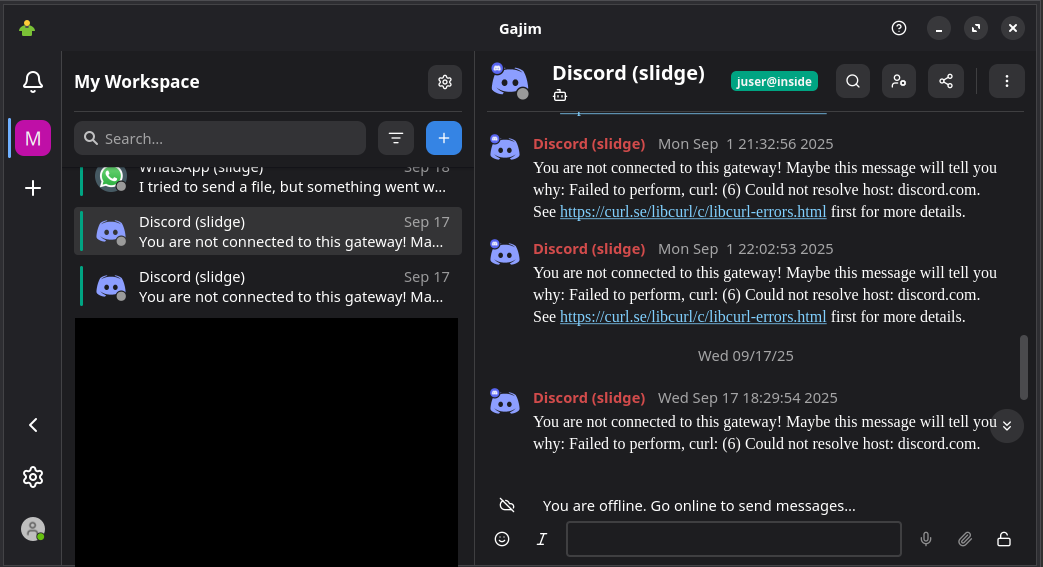
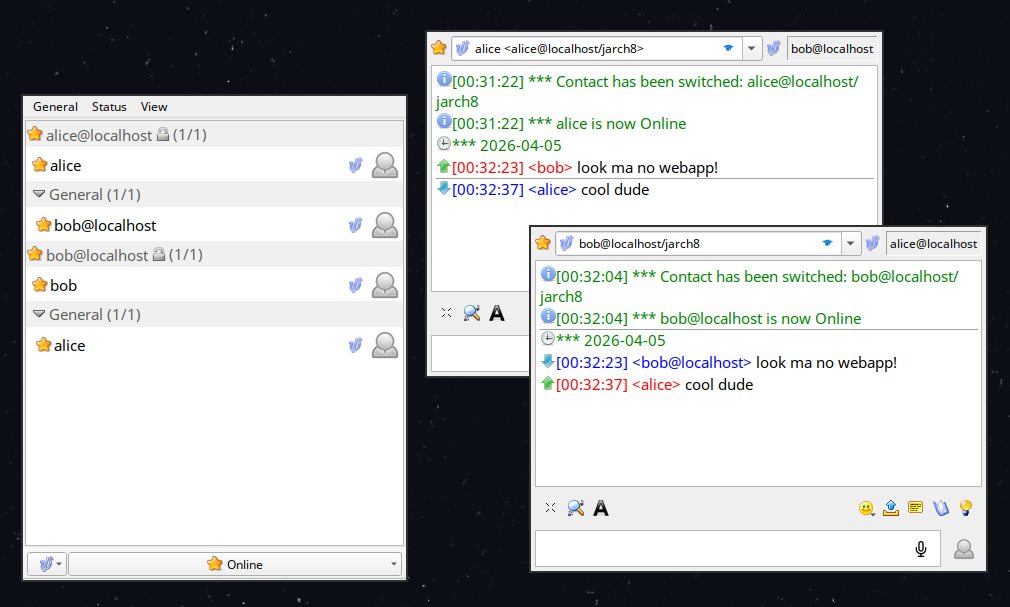
Psi+: is the QT alternative to Gajim, resembling and acting like more traditional messengers. It has fewer features and less interoperability, which reduces the quality of the bridges. Notably I believe history is still stored locally instead of downloaded from the server using MAM so its not a very good choice for bridging in particular. Despite this its easier to use and very quick.
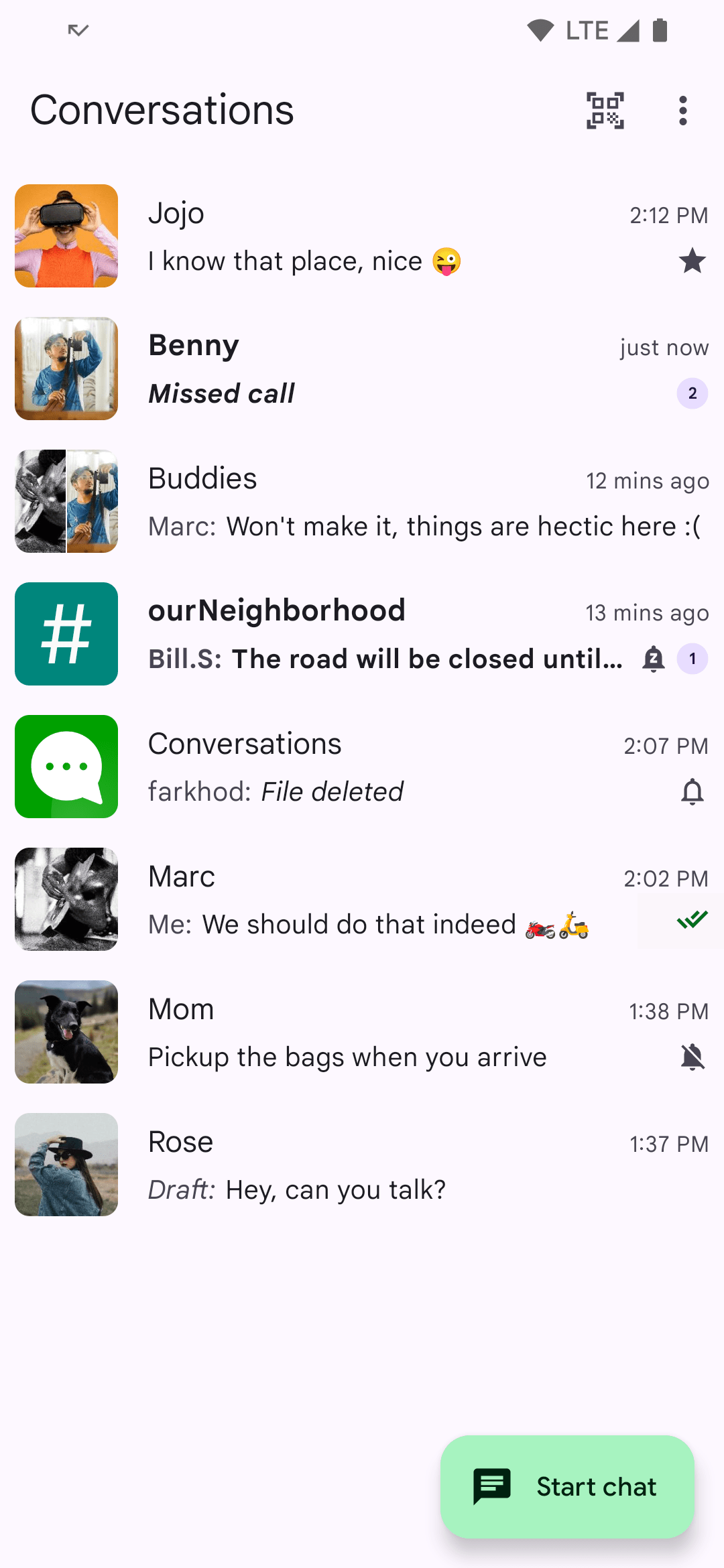
Conversations: is the main Android XMPP client. It has several forks including Cheogram and Monacles Chat. Alternatives such as A-Talk are ancient and implement a small section of the spec. Conversations is…alright. It works, it does what you expect it to, and it works well with the bridges, though somewhat annoyingly it still doesn’t support replies and just puts the original message in quotes and yours under it7.
Read More: - Dig Deeper’s “Mitigation” of XMPP Clients - HandWiki’s Comparision of XMPP clients - xmpp.org’s List of XMPP clients
Setting Up Slidge
For each service you will have to set it up. At best this will be
just entering your username and password, press connect and everything
is pulled down into your roster. If you don’t have the
privilege extension you will have to manually add every
contact you want to talk to over XMPP to your roster by using your
clients “Start Chat” function. It should be able to auto-populate this
list with your various contacts and group chats so it isn’t too
difficult.
However The logging in part because of the Modern Internet™ sometimes involve Copying your account token using the Developer Console or scanning ASCII qr codes with your phone.
Assuming everything went as planned you should see a bot channel for
each service (yes even duplicates of the same service) show up in your
roster automatically (Add them using the “Start Chat” function their
jid’s will be “
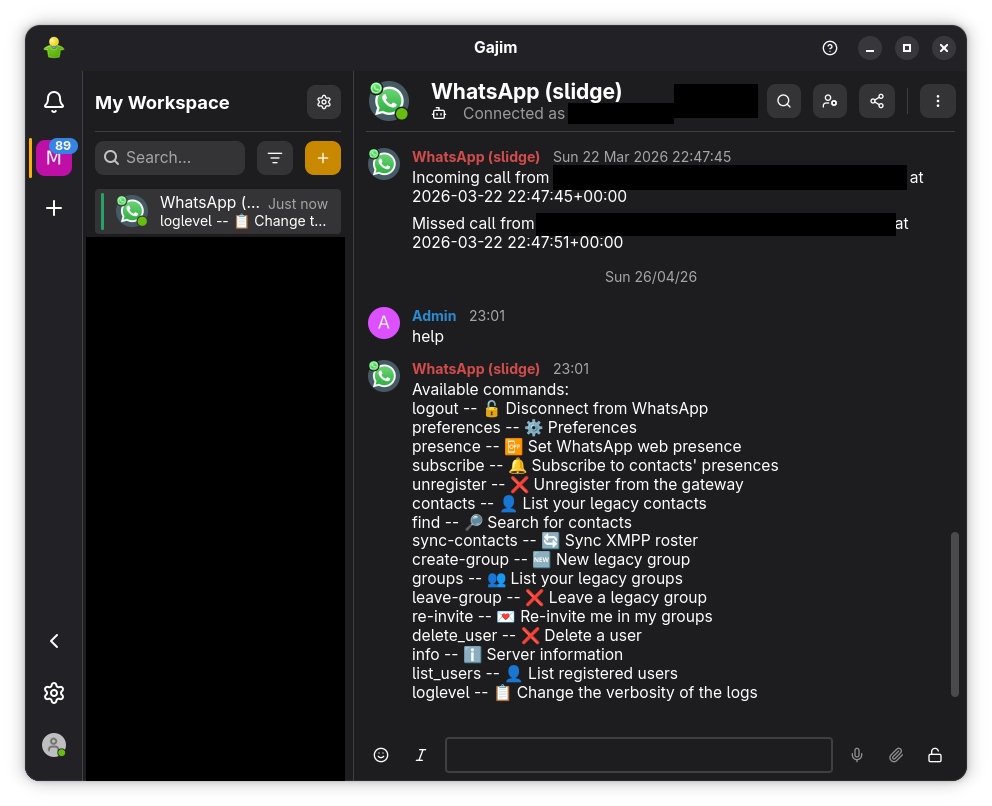
If you are COOL KID, you can use XEP-0004 Data Forms and XEP-0030 Service Discovery to use a GUI to configure your bridge instead of typing in your commands like some IRC huffing uncivilized APE.
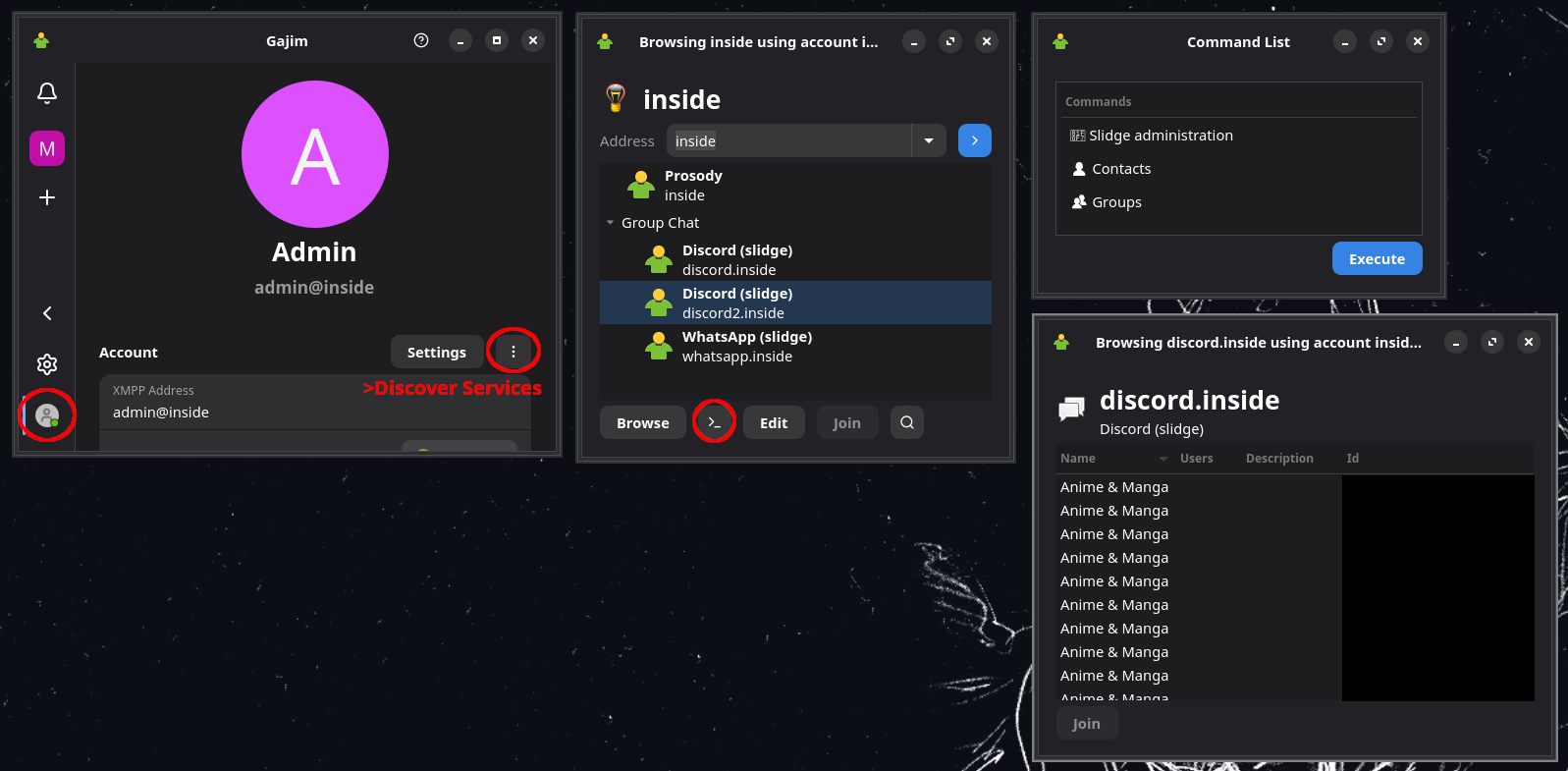
An already logged in bridge can also be configured here as well as seeing all your group chats and contacts.
Limitations
I will admit I have a low standard for “working” modern texting. The major thing I want with these XMPP bridges and texting in general is reliable notifications of new messages from individual contacts across devices and quickly sending responses. Such the limitations here does not particularly bother me however It might be a show stopper for others.
- Can receive and send messages, reactions, read receipts, emojis and replies / Dubious support for custom stickers especially on discord
- Can receive images and video / Cant send images or video
- Can accept friend requests / Dubious support for making friend requests (Out of habit and fear from when accepting a contact over Pidgin nearly banned my discord account I still always do it on the official interface, however this this should not be a problem)
- No support for audio or video calls
- Can send and receive on regular group chats[^11] (On my setup busy group chats can be a little funky and not display the latest messages, however I suspect this is a Gajim issue rather than a XMPP issue)
- “Servers” for what legacy protocols it applies to are usually implemented as a separate group chat for each channel in a server, so you can have specific channels in your roster and send and receive in them but cant view and entire server without adding every channel to your roster.
Because of these limitations whenever I want to do “serious texting” (like sending an image lmao; but more commonly to check on a server channel I’m too lazy to add to my roster) I boot up the web UI in a different Firefox profile and do whatever I need to. I still have the discord app on my phone from before I set this up but I could probably do without. So the truth is uncovered, this blog post is CLICKBAIT and I AM KILL. Whatever this is why this is at the bottom, attention deficit orange site users will never reach here.
Another major limitation is THE AI SPAM DETECTION OVERLORDS. Connecting to a legacy protocol in this manner is usually against the Terms of Service of most major platforms, especially Discord, who’s spam detection software has a specific hate boner against this sort of thing. This was a major issue with Pidgin, but mostly because It would keep fetching multiple messages at once from the past instead of as they come in. Adding a channel from a busy was also bound to get you instabanned because of the many messages being pulled. An XMPP bridge has the benefit of running all the time so only pulling in messages as they come in.
The best way to quell the AI SPAM DETECTION OVERLORD is to have your server on the same IP you normally access the legacy platform over. If you have your server running on a different machine like a VPS access your legacy protocol’s web UI over a proxy to your VPS regularly to train it as the “main” IP. Do the same but with Android VPNs making sure the mobile app always connects through the IP aswell though I don’t know the necessity of doing this. I will probably write a later blog post about doing this as part of using VPNs to secure servers.
The Future? and Beeper
I tried Beeper a few months ago when getting fed up because of an issue with my XMPP setup (I hadn’t configured image supported correctly). Funnily enough it is also based on XMPP but has its own proprietary secret sauce bridge programs, I believe you are able to connect to beeper using a regular XMPP client however this was under a special advanced option so I wouldn’t count on it. Its first party “app” is very nice and reminds me of Telegram’s.
Its a paid service with a free tier limiting you to like 3 accounts, being a paid service I expect the feature set and reliability to exceed this free-as-in-freedom setup by a wide margin, Tho I didn’t get the time to really run it through its paces.
Ultimately bridging to legacy protocols is just a band-aid, as at any time they could radically change it, implementing FaceID-Device Attestation-Retinal Scan-Anus Topology-Age Verification DRM technology just to send a request. This also doesn’t help that the person on the other end is injecting the full octane experience straight into their retinas and neural pathways, or that this doesn’t effect the culture.
It is also important to note that texting is largely useless, Instant messaging is vastly overrated. I probably would not recommend doing such a complicated setup for yourself as Instant Messaging is probably not worth the all the engineering that has gone into it. I admire it and at one point thought it necessary thus creating this setup but hearing the inane drivel and the lame injokes of the average Group Chat or Server user has dismayed me. Most people on the internet is boring and If you do find an interesting person you could instead E-Mail them for no appreciable difference but an improved experience for the both of you.
For the purposes of sending “where the hell are you we were supposed to meet 10 minutes ago” SMS was all we needed. If legacy protocols and “communities” like Discord die then nothing of value is lost.
This is, very flexible, probably too flexible, turning into a bit of a pain. Gajim instead treats groups as tags, like gmail treats folders as tags. Additionally Gajim mixes all your accounts contacts into the sidebar where their organized by most recent activity. You may like it or hate it, Psi+ perserves the more traditional tree model. A brief wiki entry on it
Pidgin (Gaim as it was known at the time) released in 1998↩︎
https://xkcd.com/1782/↩︎
Components are subprograms that integrate into XMPP naturally extending it. However XMPP is called “eXtensible” because of how it can add a (now) huge range of new standardized features over time. This is what has kept XMPP upto “Modern Texting” where the other protocols form the same era are too limiting for popular use today.↩︎
Your roster can have labeled groups, so you can have your
Workgroup and yourFamilygroup with different contacts. Groups can also be nested inside each other infinitely and arbitrarily. So you can have yourFamily, thenExtended Family, thenExtended Family I Likegroups with contacts in all of them, and contacts can be in multiple and any groups.↩︎